
Product overview
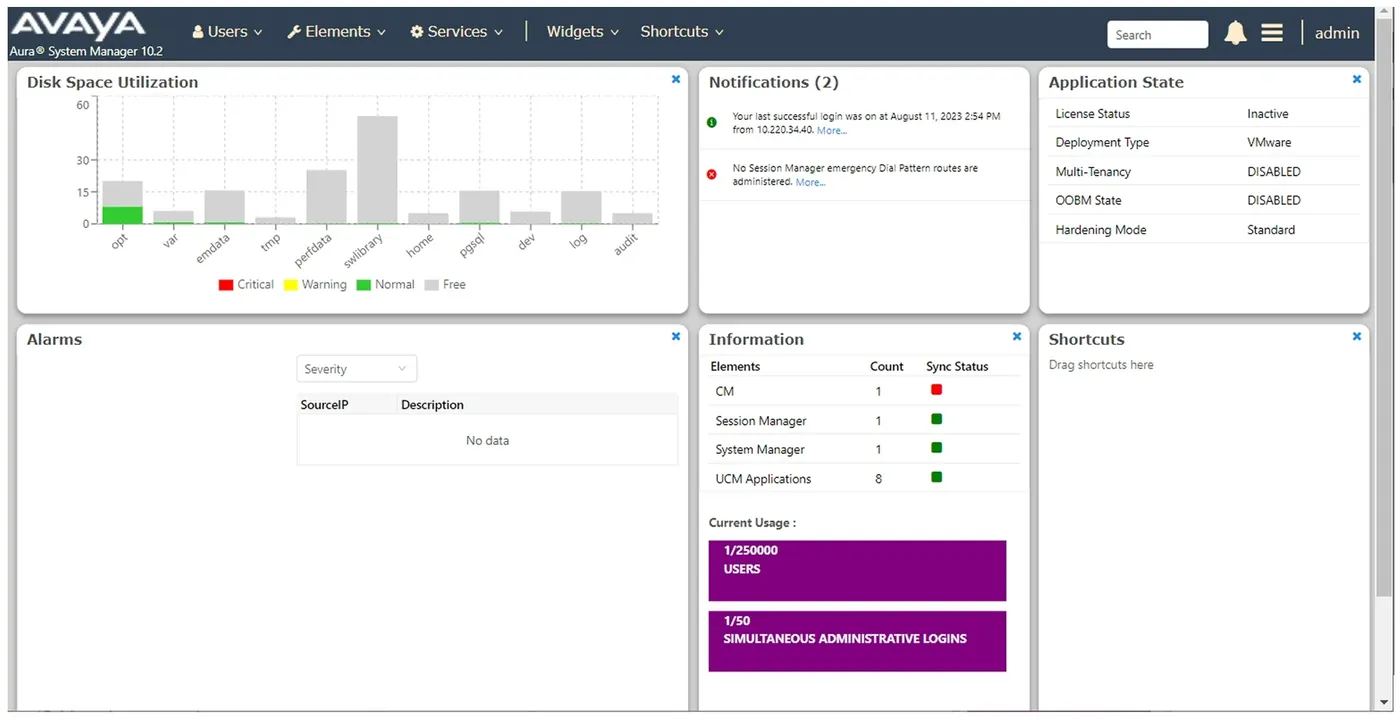
Avaya Aura System Manager is the centralised management platform for Avaya Aura, governing Aura applications and providing a common web administration console plus centralised software deployment, making it the management hub of the enterprise communications system.
Core capabilities
- Common Console: a unified web management interface that expands dynamically as applications are added or removed, covering management views from product level to suite level
- Centralized Solution Deployment Manager: deploys, upgrades, migrates and updates Avaya Aura applications, supporting customer virtualization environments, software-only environments and the Avaya Solutions Platform 130 appliance
- Automated upgrade and migration: reduces upgrade time and error rates, with pre-upgrade checks and software library management
- Centralized license and configuration management: supports Avaya Subscription licensing, encrypted backup and restore, log retention management, 16-digit extensions and product initiated registration
Deployment forms and high availability
- Supports software-only, virtualization (VMware ESXi 7.0 / 8.0 / 9.0), Red Hat Enterprise Linux (9.6) and the KVM hypervisor on RHEL 8.10 / 9.6, and the Avaya Solutions Platform 130 appliance
- Supports deployment in AWS cloud (Cloud Services)
- Supports geographic redundancy in hybrid deployment environments
- Security and compliance: FIPS 140-3 / JITC 140-3, RSA 4096-bit certificates, extended hostname verification, preservation of security hardening mode across upgrades, and Trellix AV (formerly McAfee) malware protection
Deployment client (Solution Deployment Manager Client)
- Used when System Manager is unreachable or during first deployment, to deploy OVA/ISO images to Avaya appliances, VMware virtualization or software-only environments
- The only way to deploy System Manager; runs on Windows 8.1/10/11 and Windows Server 2016/2019/2022
- Manages the virtual machine lifecycle (start, stop, restart, reset), installs patches, service packs and feature packs, configures remote Syslog and flexibly resizes virtual resources (flexible footprint)
- Supports pre-staging of System Manager OVA images, service packs and migration tool files to speed up deployment and upgrades
Avaya applications that can be managed centrally
- Session Manager and Branch Session Manager
- Communication Manager and associated devices such as gateways and media modules
- Application Enablement Services(AE Services)
- Avaya WebLM、Avaya Diagnostic Server(Secure Access Link)
- Avaya Session Border Controller (Release 8.0 and later)
- Avaya Breeze® platform and Avaya Aura® Media Server
Supplementary official documentation (Aura R10.3.x)
The following material is compiled from Avaya official overviews and specification documents to supplement version, component relationship and deployment details; refer to the original documents for definitive capacity and compatibility matrices.
- The R10.3.x documentation defines System Manager as the centralized management system providing shared management services and a unified console.
- For the Avaya Aura applications it manages, both shared and dedicated management are completed in the unified console.
- Centralized software management covers deployment, migration, upgrade and update of the application suite.
- Shared management services avoid re-entering the same data across components.
- From R10.3.x, System Manager Solution Deployment Manager is no longer provided.
Document source and download
The official document referenced here is Avaya Aura System Manager Overview and Specification R10.3.x (2026-09); the original PDF can be obtained under Product Literature in this site's Downloads section.