
Product overview
Voicemail is a standard part of an IP Office solution and can be delivered in three ways depending on the system's operating mode: embedded voicemail, Voicemail Pro and Media Manager recording archive. They are not alternatives but three tiers of capability, from good enough, to customizable, to auditable.
| Form | Runs on | Typical use | Description |
|---|---|---|---|
| Embedded voicemail | On the IP500 V2 control unit itself | Small sites with only basic messaging needs, such as retail stores and home offices | Included as standard, with no additional server and no license required; licenses raise the number of simultaneous connections and message storage; only unanswered-call messages are recorded, with no call recording |
| Voicemail Pro | A service on a separate server, on a UCM module, or on the Primary server | Needs for visual flow design, multiple languages, hunt group messaging and other customization | Works with default features, and can be deeply customized to the customer's processes |
| Media Manager | On the same machine as Voicemail Pro, or in the Avaya cloud | Long-term storage, search and playback of call recordings are required | See the Media Manager recording product page |
Where Voicemail Pro is deployed
- IP500 V2: supported in Preferred Edition or subscription mode, running on a separate server, either an IP Office application server or a UCM module inserted in the control unit.
- PC server edition: runs as a service on the Primary server; if a Secondary server is deployed, a second Voicemail Pro instance can run there to provide voicemail redundancy.
- At platform level, a Primary server supports up to 250 voicemail or recording channels; the number of usable ports depends on the licenses purchased.
- Purchasing a Preferred Edition license activates a 4-port Voicemail Pro system, expandable to 40 ports with additional licenses.
Key features
- Announcements by status: different announcements can be set for busy or no answer, and for in-hours or out-of-hours scenarios.
- Message notification: the server pushes new-message notifications to user mailboxes over SMTP.
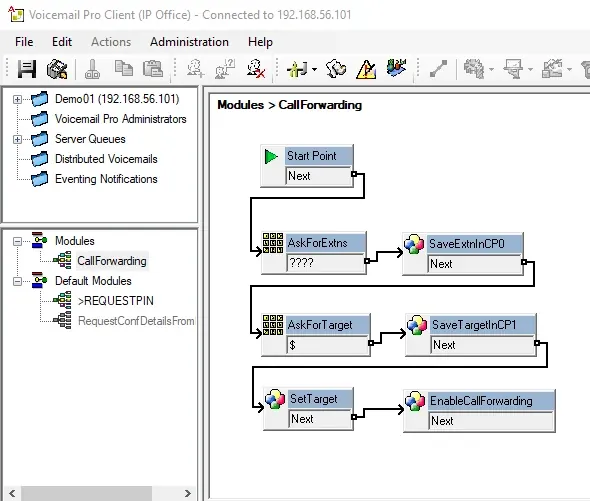
- Flow editing: call flows are built on a graphical client, locally or remotely.
- Multilingual: 22 languages are supported, including Chinese, English, Korean, Japanese, German, French and Spanish.
- Conditional routing: calls are routed by conditions such as business hours and calling number.
- Hunt group messages: callers can leave messages for a hunt group, and the message can be broadcast to every member of the group.
- Recording: calls are recorded automatically or on demand, and recordings can be searched, played back and saved through Media Manager.
- Familiar user experience: the Intuity Audix user interface is supported, keeping keypad habits consistent with Avaya Aura messaging.
- Announcement recording: announcements can be recorded from an extension or a PC, with clock announcements supported.
- Centralized voicemail: within an SCN network, all IP Offices can share a single voicemail system.
- Port reservation: voicemail ports can be reserved for different purposes such as auto-attendant, recording and messaging.
Where embedded voicemail ends
For stores and service counters that only need voicemail plus a simple keypad menu, embedded voicemail is enough and no extra server is required. As soon as visual call flows, multilingual announcements, hunt group broadcasts, recorded evidence or a centralized mailbox across sites are needed, Voicemail Pro is the right choice. If recordings must also be archived long term and searchable for audit, add Media Manager.
Supplementary official documentation (IP Office R12.3)
The following material is compiled from Avaya official overviews and specification documents to supplement version, component relationship and deployment details; refer to the original documents for definitive capacity and compatibility matrices.
- The R12.3 document explains that IP Office voice applications can be delivered in different ways depending on the system's operating mode.
- The official architecture diagram shows how voice applications connect to the network and to endpoints.
- Application licenses are described from page 80 of the document, and server specifications on page 123.
Document source and download
The official document referenced here is Avaya IP Office Platform Solution Description R12.3 (2026-04); the original PDF can be obtained under Product Literature in this site's Downloads section.