
| Product details - Conference bridge |
|---|
| Product introduction. IP Office offers excellent conferencing capability for remote collaboration at enterprises of different sizes; conference resources and maximum participants by model are shown in the table below. Model | Conferencing resources | Maximum participants |
|---|---|---|
| IP Office 500 v2 | 128 parties | 64 parties |
| Server Edition R260 | 128 parties | 256 parties |
| Server Edition R660/OVA | 256 parties | 256 parties |
| Elite Edition / OVA | 512 parties | 256 parties |
IP Office supports two core conferencing modes for different collaboration scenarios: ad-hoc conferences, where a user places calls from an extension to bring several parties together quickly, and meet-me conferences, where participants dial a preset conference room number to join, which is quick and simple.
Meet-me conferencing is especially powerful, with its main advantages in the following three areas:
1. Multiple authentication layers for conference security
- Password verification: participants must enter a conference password to join, and the password can be changed from an extension or from an outside line, adapting flexibly to management needs;
- Name recording and screening: participants record their name before joining, and existing participants can listen to the recording and decide whether to admit them, screening attendance further;
- Conference room locking: once all expected participants have joined, the room can be locked so that even someone with the password cannot enter, protecting privacy.
2. Comprehensive conference management for more efficient collaboration
- Personalized welcome message: users can record a conference welcome message from an extension or an outside line to set the tone for their meeting;
- Visual web management: the full participant list is visible in a web page, with mute and remove for named participants and the ability to lock the conference room directly, which is simple and efficient;
- Conference recording and retrieval: the system records the whole conference and the recordings can be searched quickly through Contact Store for later review and traceability.
3. Seamless integration with the telephone system for low-cost, efficient collaboration
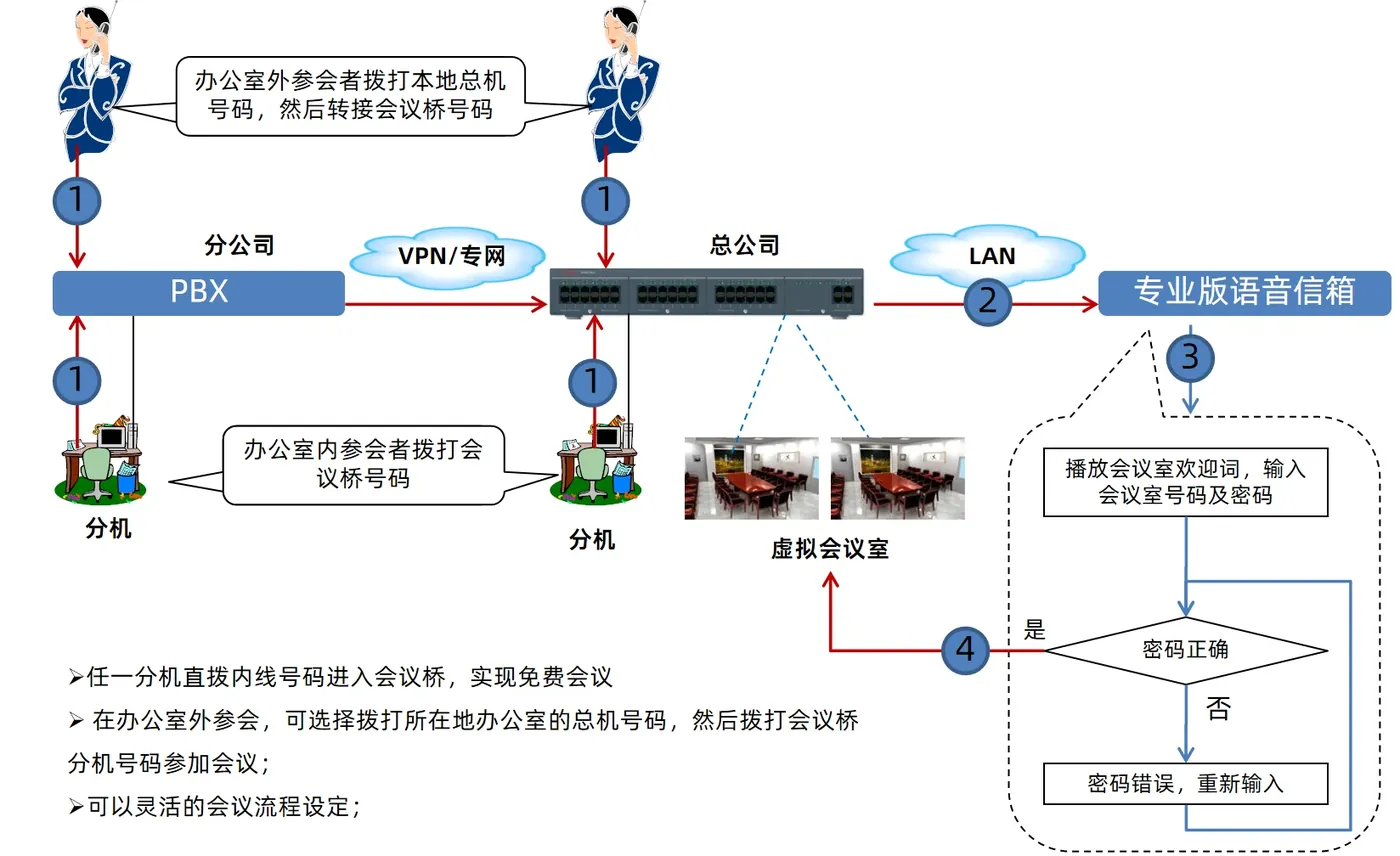
- Flexible networking: IPO can act as a standalone conference bridge, networking with office PBXs over mainstream protocols such as ISDN PRI, H.323 and SIP, and fitting existing communications architecture;
- Multiple ways to join: participants can dial an internal extension number, dial a dedicated DID number from outside, or be transferred by an auto-attendant, meeting the access needs of internal and external participants;
- Low-cost communications: riding the VoIP network of the office telephone system makes conferencing low-cost or even free, greatly reducing communications spending;
- Convenient remote access: VPN phones, IP softphones and other endpoints join over the internet, removing geographic limits entirely and avoiding long-distance charges.
Supplementary official documentation (IP Office R12.3)
The following material is compiled from Avaya official overviews and specification documents to supplement version, component relationship and deployment details; refer to the original documents for definitive capacity and compatibility matrices.
- The application server architecture diagrams in the R12.3 document include conferencing and self-service modules.
- The document describes application licences (page 80) and server specifications (page 123) separately.
- The deployment form of conferencing capability should be verified against the platform configuration guidance in the official documentation.
Document source and download
The official document referenced here is Avaya IP Office Platform Solution Description R12.3 (2026-04); the original PDF can be obtained under Product Literature in this site's Downloads section.