

Product overview
IP Office IP500 V2 is a family of stackable hardware units that can stand freely or be rack-mounted with an optional 19-inch rack kit or wall-mount kit. At the heart of the system is the IP500 V2 control unit: base cards and trunk daughter cards are fitted into its 4 base card slots to connect non-IP extensions and non-IP trunks, and IP500 external expansion modules add further ports. The control unit itself natively supports IP trunks and IP telephones.
The IP500 V2 runs in all supported IP Office modes. In an IP Office Server Edition or Select system it can join as a Server Edition expansion system, bringing analog and digital telephones and analog or digital trunks into a unified server edition solution. Note that the newer IP500 V2A control unit has replaced the original IP500 V2 control unit; unless stated otherwise, the two are identical in physical form and function.
Control unit specifications
| Item | Specification |
|---|---|
| Maximum extensions | Up to 384 |
| Conferencing resources | 128 parties included as standard, up to 64 parties per conference; silence suppression is enabled automatically above 10 parties |
| Trunk cards | Up to 4 |
| Voice compression channels | Up to 148 channels (VCM and combination card compression resources combined) |
| Voicemail channels | A Primary server supports up to 250 voicemail or recording channels; in a Select deployment the Secondary server also supports 250 |
| Power | Built-in power supply unit |
| Mounting | Free-standing, rack-mounted or wall-mounted (rack and wall kits required) |
| Configuration file | Maximum 2048 KB |
| Localization | Supports more than 50 countries and regions, including China |
Slots and ports
The control unit provides four IP500 base card slots, numbered 1 to 4 from left to right. Normally the slots can be used in any order; when the number of cards of a given type exceeds system capacity, the card in the rightmost slot is disabled. Each base card has its own front panel and ports: the eight ports on the left are normally used for extension devices, but if a trunk daughter card is fitted to that base card, the four left-hand ports switch to connecting trunk lines.
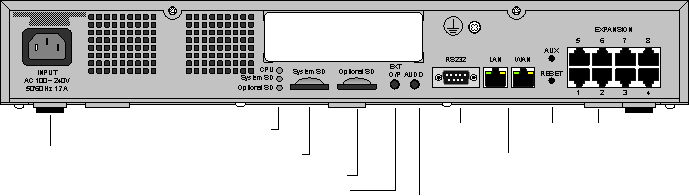
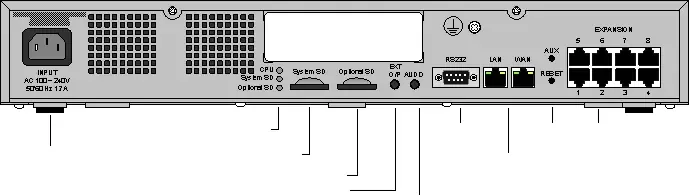
The backplane provides a power socket with status LEDs, the system SD card slot and an optional SD card slot, an external output switch, an external music-on-hold (MOH) input, an RS232 DTE serial port, LAN1 and WAN (LAN2) network ports, a reset switch, and an expansion port for connecting expansion modules. LAN1 connects to the corporate LAN and LAN2 can serve as a WAN port, with built-in IP routing, switching and firewall protection between the LAN and WAN.
Feature Key and licensing
The serial number of the Feature Key SD card fitted in the control unit is the basis on which all licenses for the IP Office system are issued, and is used for periodic entitlement checks. If the Feature Key SD card is removed, licensed features stop working one after another over the following hours. In subscription mode the subscription is also tied to that serial number, so the card should be kept safe as a system asset.
Configuration and selection guidance
- Extension capacity: up to 384 extensions per control unit; when more ports are needed, external expansion modules add 16 or 30 ports each.
- Analog and digital trunks: provided by base cards with trunk daughter cards, with a maximum of four trunk cards in total across analog, BRI and PRI.
- IP trunks and IP telephones: these do not occupy trunk card slots and are carried directly by the control unit and its voice compression resources.
- Voice applications: voicemail, recording archive and one-X Portal can run on a UCM V2 module inserted in the control unit, or be deployed on a separate application server.
- Multi-site networking: within an SCN network, centralized voicemail and a common dial plan can be shared, supporting up to 150 sites and 3,000 extensions.
- Power-fail transfer: pairing an 8-port analog telephone card with an analog trunk card reserves one trunk per extension, so calls can still go out during a mains failure.
Supplementary official documentation (IP Office R12.3)
The following material is compiled from Avaya official overviews and specification documents to supplement version, component relationship and deployment details; refer to the original documents for definitive capacity and compatibility matrices.
- The R12.3 document describes IP Office as a modular platform whose control unit and expansion unit combinations can be chosen to suit the scale required.
- The official documentation includes a physical description of the control unit front panel and port layout, plus server specifications on page 123.
- The combination of control units, expansion modules and cards should be checked against the modular configuration guidance in the documentation.
Document source and download
The official document referenced here is Avaya IP Office Platform Solution Description R12.3 (2026-04); the original PDF can be obtained under Product Literature in this site's Downloads section.