
Product overview
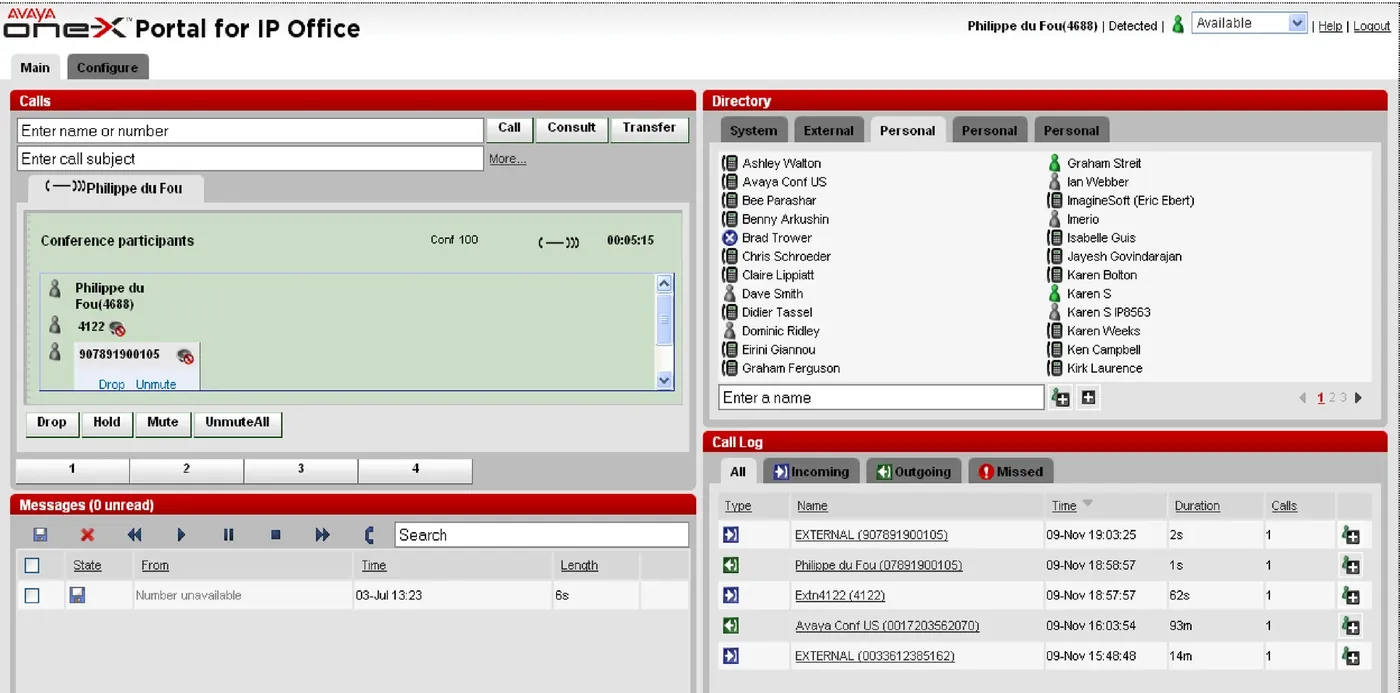
Avaya one-X Portal for IP Office is a web application running on a server on the IP Office side. Users log in through a browser and take control of their own telephone from any networked computer, whether analog, digital, IP, wired or wireless, provided the user holds an Office Worker, Power User or Teleworker user license.
The portal is deployed separately from the IP Office telephone system and brings call control, presence, instant messaging, the corporate directory and conferencing together in one browser page. For teams with dense agent positions, frequent travel or remote working needs, it turns key presses on the phone into a visual interface on the computer.
What the portal provides
- Call information: current calls, waiting calls and history on one screen.
- Call and conference control: start calls, answer, hold and resume, hang up and bring multiple parties into a conference from the web page.
- Presence and instant messaging: status notification, monitoring and message archiving.
- Contacts: import and export, with user photos.
- System directory: XMPP groups appear directly in the System Directory tab, so departments and skills groups are easy to see.
- Conference bridge: dial into your own conference bridge in one click and invite other users to join.
- Meeting scheduling: port reservation, email notification and automatic meeting reports, all from within the Outlook interface.
- Web conferencing: start a conference in one click and join as a participant through single sign-on.
Requirements on the call path
In telecommuter mode the one-X application needs trunks that provide answer supervision and disconnect detection, without which features are incomplete. one-X therefore works properly on PRI, BRI and SIP trunks, but not on E1R2, T1 RBS or analog loop-start trunks. This must be checked during solution design so that remote agents are not found to be unusable after go-live.
Security and management
- Administrators can restrict access to HTTPS only, and managed deployments are advised to enable secure access only; HTTP and HTTPS can also both be enabled.
- The client forces users to change their login and voicemail passwords according to the complexity rules set by the administrator.
- The administrator console shows the current number of login sessions for each user, with detail on the Health / Active Sessions page.
- Supports blocking clients by version, clearing all sessions for a user in one action, and tracking repeated login failures.
Deployment scale and form
On IP500 V2, one-X Portal can run in the UCM V2 unified communications module inserted in the control unit: voicemail alone supports more than 200 users, while voicemail and one-X Portal together support up to 200 users with 50 concurrent one-X Portal users. Where more users or concurrency are needed, deploy the portal on a separate IP Office application server, apart from the voicemail service.
Division of labour with the phone and softphone
one-X Portal is a desktop browser entry point: it does not replace the telephone itself, nor the Avaya Workplace client on mobile. The usual combination keeps an IP phone on the desk for call quality and power-fail availability while using one-X Portal for call control and presence, with field and home workers using the Workplace client on the same extension. Note that instant messaging in the mobile Workplace client also requires one-X Portal or Avaya cloud services.
Supplementary official documentation (IP Office R12.3)
The following material is compiled from Avaya official overviews and specification documents to supplement version, component relationship and deployment details; refer to the original documents for definitive capacity and compatibility matrices.
- The one-X Portal architecture diagram in the R12.3 document shows how it connects to IP Office Manager, Server Edition Primary and Secondary servers and expansion systems.
- Avaya documentation organizes IP Office Server Edition into Primary, Secondary and expansion systems.
- Application licences are described separately from page 80 of the document.
Document source and download
The official document referenced here is Avaya IP Office Platform Solution Description R12.3 (2026-04); the original PDF can be obtained under Product Literature in this site's Downloads section.