
Product overview
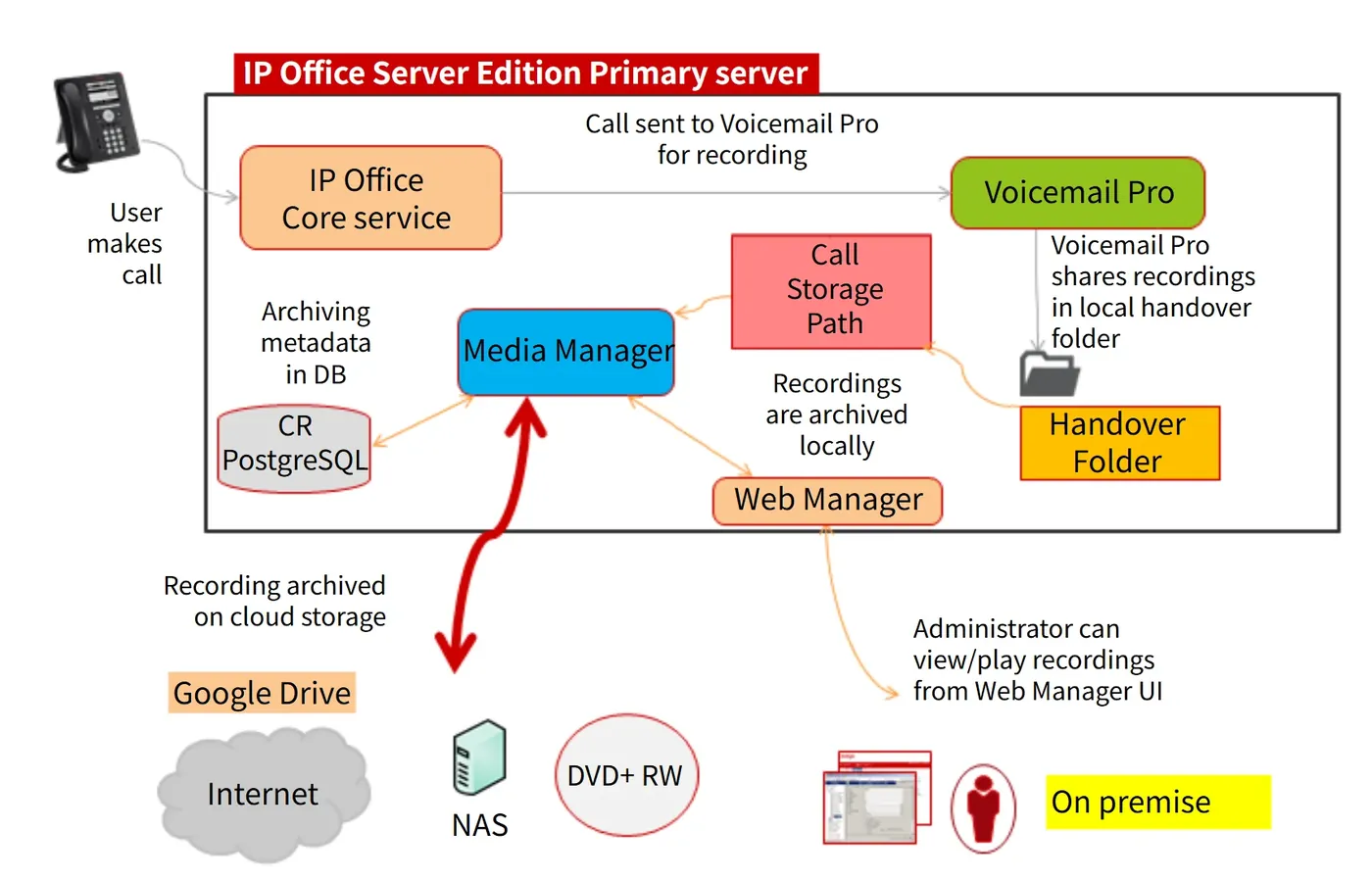
IP Office Media Manager stores and plays back call recordings produced by Voicemail Pro. Recordings can be held on the server's local disk or in cloud storage, and copies can also be archived to DVD, NAS or cloud storage. Media Manager indexes recordings so that administrators and authorized users can search, play back and download them by criteria.
Access differs by role: system administrators see all recordings and system settings through IP Office Web Manager and can grant permissions to other administrators or extension users; extension users reach the recordings they are authorized for through IP Office User Portal.
Where it runs and when it is available
- Media Manager must run on the same server as Voicemail Pro; Avaya documentation explicitly does not support deploying it separately on another server in the network.
- In a network built around a primary server, Media Manager is supported only on the primary server; in a standalone IP500 V2 or IP500 V2 SCN network, the IP Office Application Server that hosts Voicemail Pro also hosts Media Manager.
- Deployment on the Unified Communications Module (UCM) is not supported.
- If the Server Edition primary server is unavailable, Media Manager is unavailable too. With Voicemail Pro redundancy configured, the standby server can still record but cannot play recordings back for the time being. Once the primary server recovers, the two servers transfer the recordings made during the outage back to the primary over SFTP and access resumes.
From trigger to archive
- IP Office requests a Voicemail Pro recording: this can be triggered automatically for a given user, hunt group, incoming call route or account code, by a Voicemail Pro voicemail call flow, or manually by the user during a call.
- The target in the recording configuration determines where files go: the mailbox, or the Voice Recording Library (that is, Media Manager).
- When the target is the Voice Recording Library, Voicemail Pro places the recording in the handover folder.
- The Media Manager service continuously monitors the handover folder, moves new recordings into the primary storage folder (local disk or cloud directory) and writes the call information into the Media Manager database.
- If an external archive connector is configured, Media Manager copies new recordings to the archive location as well.
Two forms: local and centralized
Avaya documentation splits Media Manager into local and centralized forms. This guide covers local Media Manager, provided by the local IP Office, Voicemail Pro and the Media Manager service together; the cloud-based centralized Media Manager available with subscription-mode IP Office is described in Administering Avaya IP Office Platform with Web Manager. The two are selected in the Media Archival Solution settings in Web Manager.
For scenarios requiring long-term evidence, quality monitoring or compliance archiving, the value of the local form is that it turns recordings from mailbox attachments into a searchable, archivable and auditable recording library; capacity, retention period and archiving method should be determined during solution design based on business volume.
Storage planning and capacity
- Recording file footprint: about 60 KB per minute for unauthenticated files and about 120 KB per minute for files with authentication information.
- Primary storage requires a minimum of 30 GB, and Avaya recommends 300 GB or more; size it from typical call volume, average duration and retention period.
- Note: do not store recordings on the same disk as Voicemail Pro. Avaya explicitly does not support this, because it competes for space with other IP Office applications and risks losing recordings during maintenance. Add a dedicated disk to the server instead, preferably configured as a RAID pair.
- Primary storage can also use cloud object storage directly: Google Cloud Bucket, Azure Blob or Amazon S3 Bucket.
- Secondary archive locations can be DVD, NAS or the customer's own cloud storage; primary storage keeps the more recent recordings while the archive holds older ones. Playback prefers the original in primary storage and falls back to the archived copy once the original is deleted.
- Days to Retain Calls defaults to 180 days (0-180 days can be set); 0 means recordings in primary storage are kept indefinitely. When external storage is used, check that storage's own file aging policy.
Access rights, encryption and audit
- Administrators: by default they can use Media Manager settings and all recordings through Web Manager, and can add other administrators.
- Extension users: once Media Manager Replay is enabled in User Portal, playback can be set to all recordings, only the user's own recordings, or recordings within an authorized scope.
- On IP Office R11.1 and later, recordings in primary storage are encrypted. Encrypted recordings can only be played through IP Office interfaces such as Web Manager and User Portal, and are decrypted by Media Manager when downloaded through those interfaces. Once downloaded, files are no longer governed by Media Manager or the audit trail, and local data protection requirements must be met independently.
- Recordings are stored in Opus format and can be played in browsers such as Firefox, Edge, Chrome and Safari.
- Search fields include call date and duration, call direction, calling and called numbers, agent, skills group, Call ID and the owner of the recording; a filter returns up to 35,000 recordings at a time, and up to 50 can be downloaded in one go.
- The audit trail records search, playback, download and delete operations, is retained for 180 days by default and can be exported.
Recording triggers and licensing
- Automatic recording can be configured per user, hunt group, incoming call route and account code. The trigger frequency can be set to no recording, On (record whenever a recording channel is free), Mandatory (return busy to the caller if no recording channel is available) or a percentage sample, and can be limited to time periods and call types (internal, external or both).
- IP Office in non-subscription mode requires a Media Manager subscription license: standalone IP500 V2 systems and Server Edition primary servers all need it, and with dual active voicemail servers both the primary and standby servers need licenses reserved.
- You can confirm whether the VRL (Media Manager) license is active under Help > About in the Voicemail Pro client, or in Web Manager.
Document source and download
This page is compiled from Avaya Administering Avaya IP Office Platform Media Manager, Release 12.2 (December 2025). The IP Office Media Manager Administration guide offered under Management Guides in this site's Downloads section is Release 12.2 SP1, with more chapters but the same key specifications.