
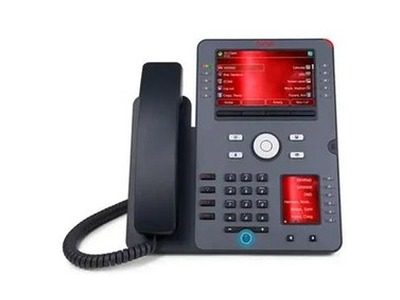
Product overviews
The Avaya J189 lifts the desktop communications experience with competitive pricing and strong performance. Its 5-inch 800 × 480 main display can be split, and together with the 2.3-inch second display it offers 16 physical keys; the second display serves as the first expansion module, with room for two more J100 modules. An optional J100 wireless module adds Wi-Fi and Bluetooth headsets, and dual Gigabit ports and wideband HD audio complete an offering that integrates deeply with Avaya Aura — well suited to high-volume professional roles.
This page is compiled from the original text of Avaya's online Devices and Phones catalogue and the official documentation for each model, for selection reference only. For specific configurations, software releases and availability, please rely on manufacturer documentation and confirmation from our solution consultants.
Highlights
- 5-inch 800 by 480 main display with split-screen support plus a 2.3-inch 240 by 320 secondary display
- Ten physical keys on the main display plus six on the secondary display, 16 in total, with dual red and green LED status
- The secondary display can serve as the first expansion module, with room for up to two more J100 Expansion Modules
- Optional J100 Wireless Module adds Wi-Fi and Bluetooth headset support; wideband HD audio on handset and headset
- Dual Gigabit Ethernet ports, SIP and PoE Class 1 with power-saving sleep mode, deeply integrated with the Avaya Aura platform
Specifications
| Model | Avaya J189 IP Phone |
|---|---|
| Category | IP deskphone |
| Key specifications | 5" main + 2.3" second display · dual USB |
| Status on this site | In production |
| Official product name | J189 |
| Official documentation | Official PDF |
Avaya official documentation
Elevate the enterprise employee experience with the J189, a competitively priced, high-performing phone.
The original English descriptions from Avaya's online product catalogue are reproduced below for word-for-word verification.
Avaya official documentation
View Avaya official documentation ↗View live site ↗
Source: the Avaya online Devices and Phones catalogue and the official Fact Sheets