
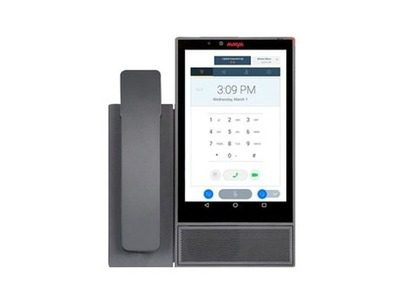
Product overviews
The Avaya Vantage K175 is a touchscreen desktop video device designed for better calling and video meetings, launching video and collaboration in one touch. An 8-inch touchscreen with an intuitive interface connects natively to Avaya solutions while also supporting third-party video and collaboration services. The built-in UC experience covers audio and video calls, conferencing and calendar, with notifications and appointments joining in one touch — suited to working from anywhere.
This page is compiled from the original text of Avaya's online Devices and Phones catalogue and the official documentation for each model, for selection reference only. For specific configurations, software releases and availability, please rely on manufacturer documentation and confirmation from our solution consultants.
Highlights
- An 8-inch touchscreen desktop video terminal that starts voice, video, chat and collaboration with one touch
- Native connection to Avaya solutions with support for third-party video and collaboration services
- The built-in UC experience covers audio and video calls, conferencing and the calendar, and a reminder joins the meeting in one touch
- Built-in 2-megapixel camera with 1080p video support
- Simple to install and ready out of the box, suited to home-office and office deployment
Specifications
| Model | Avaya Vantage K175 |
|---|---|
| Category | Smart desk devices |
| Key specifications | 8" touchscreen · 2 MP camera · 1080p |
| Status on this site | In production |
| Official product name | K175 |
| Official documentation | Official PDF |
Avaya official documentation
Purpose-built for a better calling and video meetings experience, use the K175 to start video and collaboration in just one click.
The original English descriptions from Avaya's online product catalogue are reproduced below for word-for-word verification.
Avaya official documentation
View Avaya official documentation ↗View live site ↗
Source: the Avaya online Devices and Phones catalogue and the official Fact Sheets